
STC KSA APN settings commonly use jawalnet.com.sa for mobile internet. Start with your phone’s automatic STC profile. If STC support asks you to configure it manually, check the APN carefully, save the profile and select it for the STC SIM. On iPhone, APN editing depends on whether your carrier allows it.
This GulfJobHire guide covers Android, Samsung Galaxy, iPhone, dual-SIM phones and mobile routers. It also explains what to check when mobile data still fails. Reviewed: 19 October 2026. An APN change can correct a configuration problem; it does not guarantee faster speeds, extra data or free internet.
On this page
STC KSA APN settings: quick reference
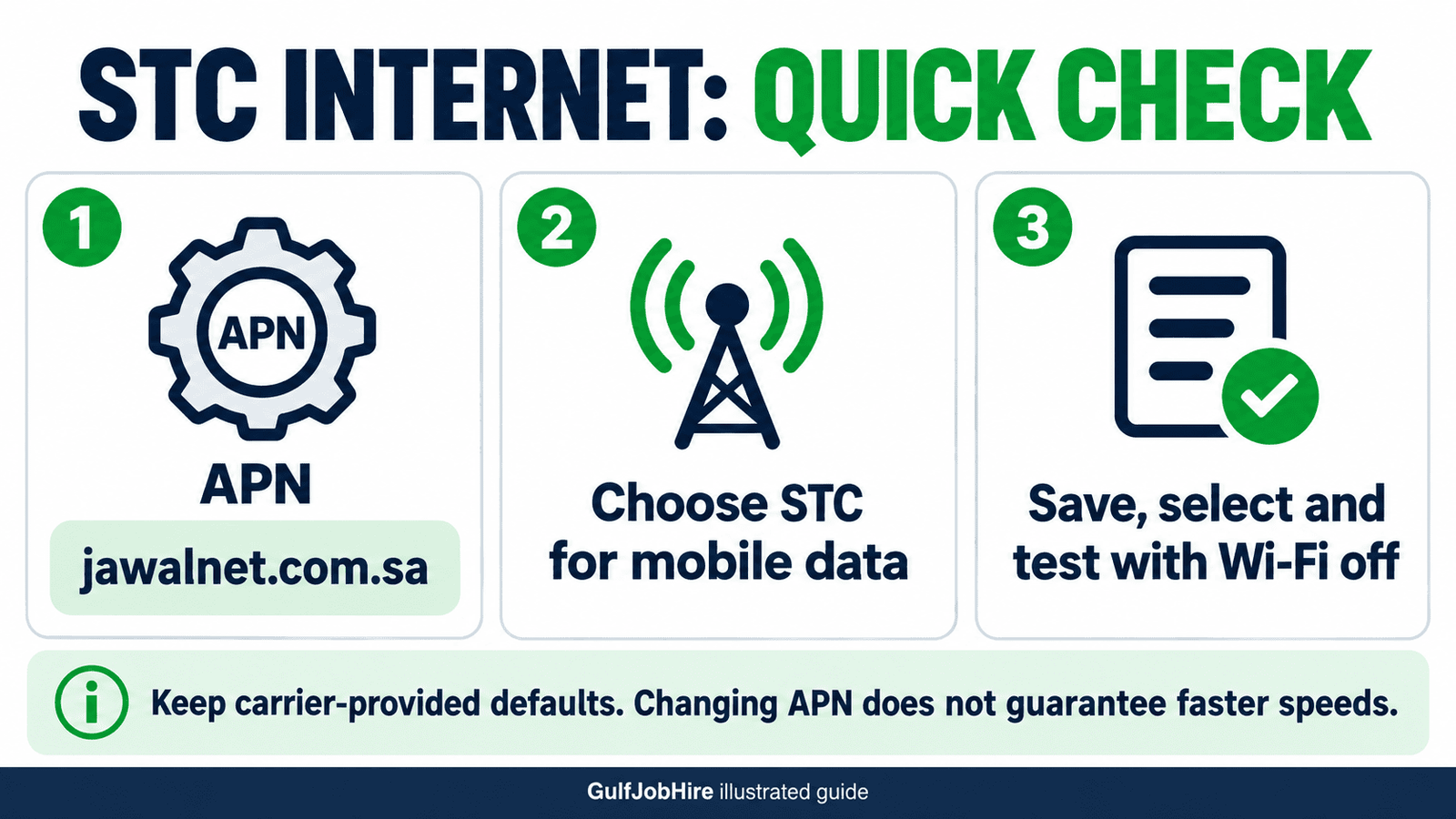
An Access Point Name tells a device which mobile-data connection to request. It is different from your Wi-Fi network name, your phone number and your account password. A device can show signal bars while its internet configuration or subscription still needs attention.
| Field | Internet profile guidance |
|---|---|
| Name / profile label | STC Internet, or another label you recognize |
| APN | jawalnet.com.sa |
| Username and password | Keep the carrier profile’s defaults; do not enter your mystc password |
| Proxy and port | Keep carrier defaults; do not add an unrelated proxy |
| MCC / MNC | STC’s sample Android entry uses 420 / 01; preserve values supplied by the SIM |
| APN type | Android’s sample entry lists default,supl; retain the provisioned profile unless STC directs a change |
| Protocol, roaming protocol and bearer | Keep automatic or carrier-provided settings |
Source scope: the Android Open Source Project sample APN configuration documents the STC internet APN and network identifiers. It is a technical reference, not a current STC promise that every product uses identical settings. A corporate SIM, specialized service or carrier-managed device may need a different profile.
There is no need to copy every field from a long online table. Start with the profile supplied to your device, and change only what STC tells you to change. In particular, do not overwrite existing MMS, IMS or other service profiles with a generic internet entry.
Before changing STC KSA APN settings
First establish whether the problem is actually mobile data. If websites work over Wi-Fi but stop when Wi-Fi is off, you have isolated the test to the mobile connection. If Wi-Fi also fails, investigate the device or that Wi-Fi connection separately. Editing a cellular APN does not repair a home broadband Wi-Fi password.
- Confirm that the STC line is active and has an applicable data allowance.
- Check which SIM is selected for mobile data on a dual-SIM phone.
- Note whether the screen shows normal network service, no SIM, searching or another message.
- Keep a private note of the original internet profile before changing it.
- Use a small browser test rather than a large download while diagnosing the problem.
For allowance and account checks, read our STC balance and data guide. An APN entry cannot renew an expired bundle or remove a restriction on an account. Confirming the package first avoids spending time editing a correct profile.
Write down what changed just before the connection failed: a new SIM, replacement phone, software update, travel, plan change or manual settings edit. That short history is often more useful to support than a screenshot of twenty empty fields.
How to check STC KSA APN settings on Android
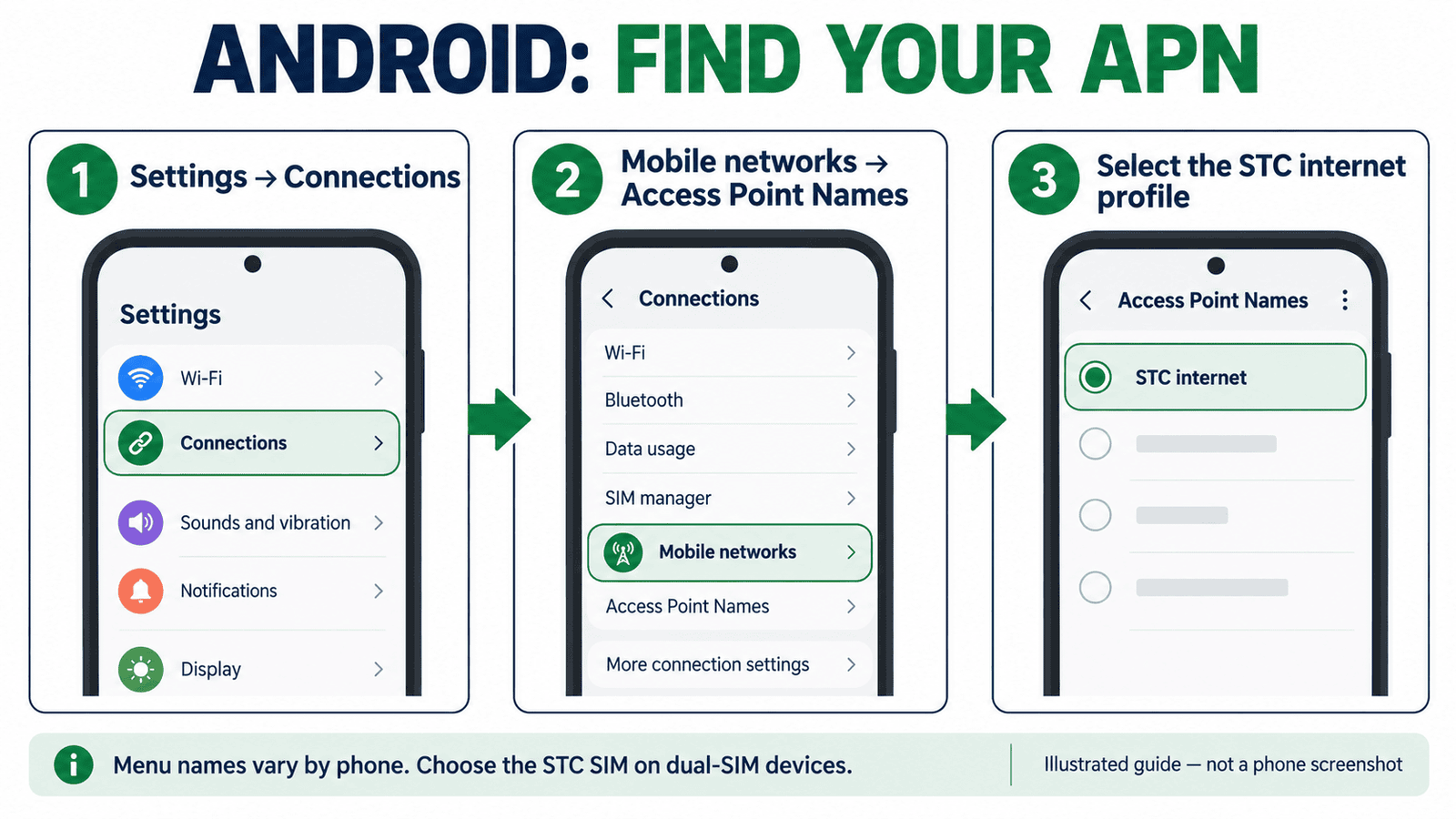
On many Samsung Galaxy phones, the route is Settings → Connections → Mobile networks → Access Point Names. Samsung documents this route in its official APN help. Other Android brands use different names; search Settings for “APN” or “Access Point Names” if necessary.
- Open your phone’s Settings app and the mobile-network settings.
- Choose the STC SIM if the phone asks which line to manage.
- Open Access Point Names and inspect the existing internet profile.
- If manual setup is required, use Add or New APN where available.
- Enter a recognizable profile name and the APN confirmed for your line.
- Keep the remaining carrier values unless support supplies replacements.
- Use the profile’s Save command, then select the intended internet profile.
- Test a webpage with Wi-Fi off and mobile data on.
The menu for saving may be a three-dot button, a check mark or a separate Save option. Leaving the editor without saving may discard the entry. Afterward, return to the profile list and confirm that the intended profile is selected; creating an entry and activating it are different steps.
For phones whose APN list is locked, do not try hidden menus or a downloaded unlocking app. Ask STC or your device administrator whether the profile is managed. If the handset belongs to an employer, an organization policy may govern its connection.
STC KSA APN settings on iPhone
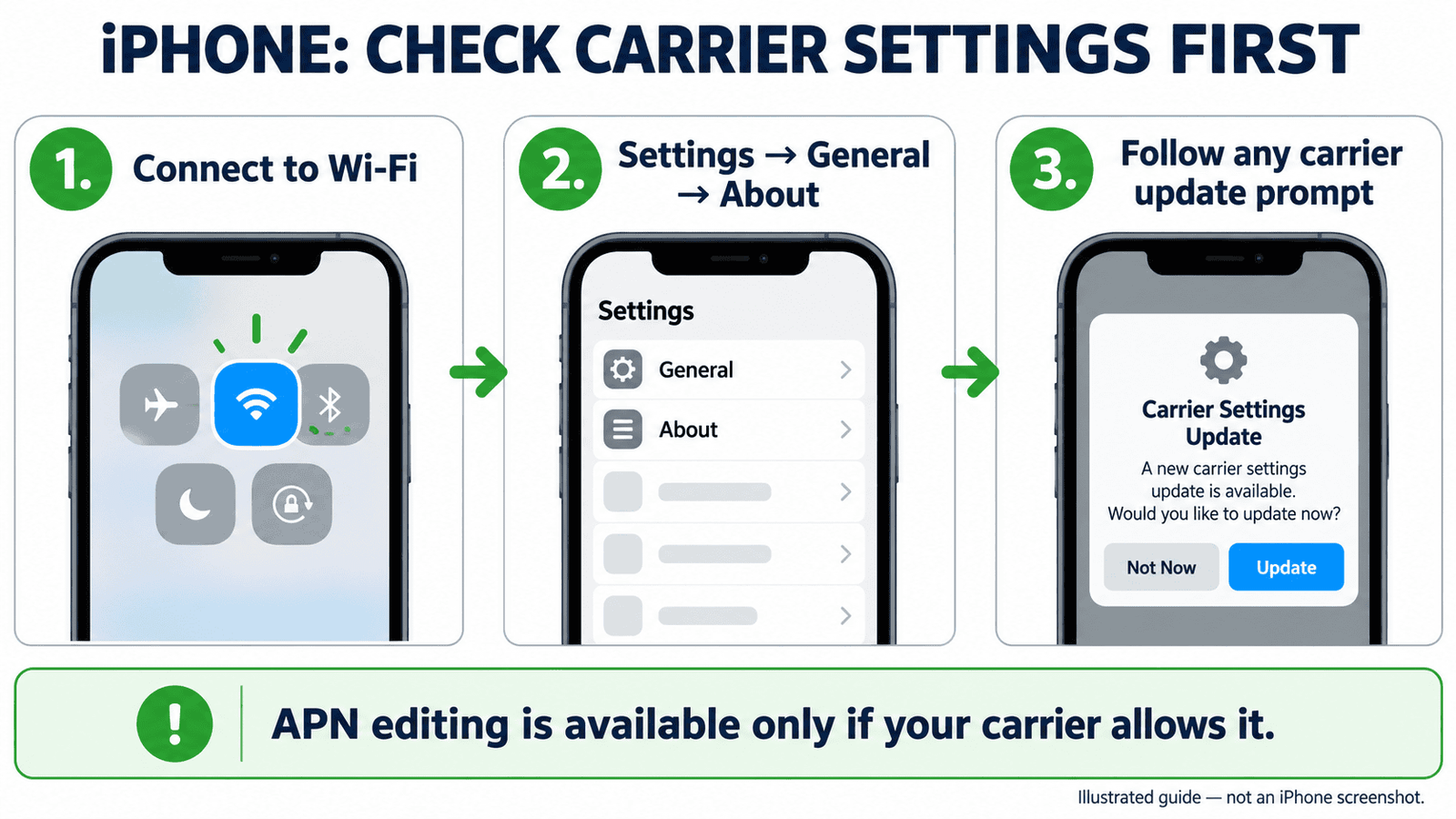
Start with the carrier configuration rather than forcing a manual profile. Connect to Wi-Fi, open Settings → General → About, and follow any carrier-update prompt. Apple explains this process in its carrier settings update guide. A new SIM or eSIM may require an update.
If manual editing is allowed, look under Settings → Cellular → Cellular Data Network, or the equivalent Mobile Data menu. Enter the values STC supplies; changes normally save automatically. If the APN menu is absent, contact STC. Apple confirms that carriers control whether these fields are editable in its APN instructions.
| iPhone item | What to do |
|---|---|
| Cellular Data APN | Use the carrier-confirmed value; the STC internet reference is jawalnet.com.sa |
| Username / password | Use carrier instructions, not your Apple ID or mystc credentials |
| Missing APN menu | Use carrier settings and request support |
| Managed work phone | Ask the device administrator before editing its profile |
Do not install a “speed booster” configuration profile from an unknown website. A profile can contain more than an APN. For a work-managed device, use the organization’s approved configuration and explain the connection problem to its administrator.
Dual-SIM, eSIM and the wrong data line
A common source of confusion is editing STC KSA APN settings while the phone is actually using another line for data. Give your SIMs recognizable labels and inspect the current data-line selection before testing. The name shown at the top of one screen may refer to a line you are editing, not necessarily the line carrying your internet traffic.
For example, a worker may keep a home-country SIM for messages and an STC SIM for local data. If the home-country line is selected for data, changing the STC profile will not fix that connection. First identify which line is being tested, then inspect that line’s settings.
An eSIM is another way of provisioning a mobile line; it is not an automatic reason to use a special public APN. Avoid deleting the eSIM as an initial troubleshooting step. Before any removal or replacement, ask your carrier how reactivation works for your plan and device.
If the display says No SIM or the line is unavailable, describe that symptom to support. Do not assume the APN is the cause. A connection profile is useful only once the device has the appropriate active mobile service.
How to test an APN change properly
Make one change at a time. If you change the APN, proxy, network mode and several other settings together, it becomes difficult to tell which change mattered. Keep a simple before-and-after note: profile selected, Wi-Fi state, data-line selection and whether a basic webpage opens.
- Save the intended internet profile and check its selection.
- Turn Wi-Fi off for the brief mobile-data test.
- Open a familiar webpage in the browser.
- Check another ordinary app to see whether the problem affects everything.
- Record the exact error rather than only saying “the internet is slow.”
- Restore the known carrier profile if your manual change made connectivity worse.
A speed-test result alone is not proof of a correct or incorrect APN. If browsing works but a particular app does not, that is a different symptom from no mobile internet at all. Mention this distinction when reporting the problem.
For a useful comparison, test in roughly the same location with the same line. A result from a different building, network or time of day does not isolate the effect of the APN. Avoid repeatedly running large speed tests if your remaining allowance is limited.
STC mobile data not working: troubleshooting
| Symptom | Useful next check |
|---|---|
| Signal appears, but no websites open | Data allowance, selected SIM, internet profile and account support |
| Wi-Fi works, mobile data does not | Test the mobile line with Wi-Fi off |
| Only one app fails | Check that app and its data permissions separately |
| APN cannot be saved | Check for a validation message or managed profile |
| No SIM / no service | Line activation, SIM recognition and coverage |
| Internet works, picture messages fail | Ask for MMS-specific support; keep the working internet profile |
Google’s mobile connectivity guide recommends checking whether mobile data and the SIM are enabled, checking coverage and asking the carrier about outages or plan changes. Its device-specific diagnostic features are not available everywhere, so follow the instructions appropriate to your own handset.
If your iPhone shows SOS, No Service or Searching, use Apple’s mobile-network troubleshooting and confirm the line’s position with STC. That message should not be treated as proof that a particular APN field is wrong.
When a new profile disappears after saving, read any warning and verify that you are editing the correct SIM. Do not keep adding duplicates with slightly different spellings. Record what happens and ask whether the device is using a carrier-managed profile.
Reset APN defaults before a full phone reset
If manual edits caused the problem, restoring the carrier’s APN defaults may be appropriate. Samsung documents an APN-specific route under Access Point Names: open More options, choose Reset to default and confirm the displayed reset. See Samsung’s reset instructions.
Apple provides Reset Settings within the Cellular Data Network screen where that screen is available. A configuration profile may supply the defaults. This differs from resetting every network setting on the phone.
Read the confirmation screen carefully before using any reset. An APN reset, a broader network reset and a factory reset are different actions. Broader resets can remove saved connections or preferences; do not choose an erase-all-content option merely because mobile data stopped working.
On an employer-managed phone, ask the administrator before resetting anything. Keep a way to reach support over Wi-Fi or another working connection if the reset does not restore service. Afterward, verify the data line and active profile rather than assuming the correct entry was selected automatically.
Can you get STC internet settings by SMS?
Older online guides describe sending “JawalNet” to 2222 and entering PIN 1234. We could not confirm that complete method in current public STC guidance reviewed for this article. It should not be presented as a guaranteed setup procedure for every modern phone.
Instead, ask STC through its official channels whether automatic settings are available for your device and plan. Do not confuse an internet-configuration message with a package activation code, account login code or SIM PIN. Do not send an OTP to someone who offers to configure the phone remotely.
STC KSA APN settings for 4G and 5G routers
Start with the automatic STC profile in your router. If support confirms that a manual profile is needed, use the APN supplied for that SIM and product. A general mobile-internet reference should not be treated as a universal setting for business connections, private APNs or every home wireless package.
Find the router’s administration address and login instructions on its label or official manual. Menu names differ by model; look for the mobile connection or profile management section. Record the current profile, apply only the confirmed values and save according to the manufacturer’s instructions.
A Wi-Fi connection to the router only confirms that your phone can reach the local wireless network. It does not prove the router has an active cellular internet connection. Check the router’s own connection status and the SIM’s package before changing Wi-Fi settings.
Do not publish a photo showing the router’s administrator password, Wi-Fi key or SIM identifiers. If support needs a diagnostic screenshot, use its official private channel and include only the requested details.
MMS settings and internet APNs are different
MMS is a separate service configuration. Do not replace a working internet APN with an MMS-only entry. Likewise, a picture sent through a messaging app uses that app’s internet connection; it is not a reliable test of the carrier’s MMS service.
An MMS profile needs complete carrier-confirmed values. GulfJobHire does not recommend copying incomplete tables or combining values from different profiles. Ask STC for the current MMS settings and service availability for your line, then follow the handset manufacturer’s instructions.
Does changing the APN make STC internet faster?
Correct STC KSA APN settings can help a device request the intended data connection. They do not create extra radio coverage, upgrade a subscription or unlock unlimited data. Treat “secret fastest APN” claims cautiously when they offer no carrier documentation.
Compare the actual problem: no connection, intermittent service, slow downloads, high delay or one app failing. Ask STC to assess coverage and the subscription before assuming another APN will improve performance. Keep your test conditions consistent and avoid changing several fields simply to chase a higher speed-test number.
What to tell STC support
STC lists 900, mystc chat and stores among its official contact channels. Explain the symptom, handset model, operating-system version and whether it started after a change. Ask support to confirm the correct internet profile for your specific line.
A clear request is: “My STC line has mobile data enabled, but webpages do not open with Wi-Fi off. I am using this phone model, and this started after this change. Please check the line and confirm whether I should restore the automatic APN or enter a manual profile.”
If service fails in one location but works elsewhere, mention that difference. If you already restored defaults, say so. Keep the support reference so that a follow-up can build on the same case instead of starting the explanation again.
STC KSA APN settings: frequently asked questions
What is the STC Saudi Arabia internet APN?
The documented general internet reference is jawalnet.com.sa. Keep your carrier-provided profile and confirm exceptions for specialized services with STC.
Why is the APN menu missing on iPhone?
The carrier controls whether APN editing is available. Use the carrier-settings route and ask STC if a manual change is needed.
Should I enter my mystc password in the APN?
No. An account login password is not an APN credential. Use only connection credentials explicitly supplied for that service.
Is there a special APN that guarantees 5G?
An APN alone does not guarantee 5G availability or speed. Confirm device compatibility, coverage and plan support with the carrier.
Does saving an APN activate it?
On Android, check the profile list after saving and select the intended internet entry where selection is offered.
Will this setup provide free STC internet?
No. Editing the connection settings does not provide a data allowance or bypass subscription charges.
Should I change MMS settings when browsing already works?
Keep the working internet profile. If carrier picture messaging fails, request MMS-specific help instead of replacing it with an unverified table.
Can I use these settings for STC outside Saudi Arabia?
This guide concerns STC Saudi Arabia. Do not assume that another country’s carrier or a roaming arrangement uses the same profile.
Related GulfJobHire guides
- Check STC balance and remaining data
- Check SIMs registered under your Iqama
- Find an Iqama number by border number
GulfJobHire is an independent information website. This guide explains setup and troubleshooting; STC controls account activation, package conditions and carrier provisioning.