
For a Mobily number check in Saudi Arabia, dial *222# from your Mobily SIM. Select the correct line on a dual-SIM phone, press call and read the number returned. Mobily publishes this command in its official Visitor package user guide.
If the code does not work, check your signed-in Mobily account, call a trusted phone or contact customer care. This GulfJobHire guide explains five practical methods, corrects misleading SMS advice and distinguishes your mobile number from a SIM serial or billing account number. Official sources reviewed: 19 October 2026.
On this page
Mobily number check: quick answer and methods
| Method | What to do | Best use |
|---|---|---|
| USSD number inquiry | Dial *222# from your Mobily line | Start here when the SIM has network service |
| Mobily account | Check the selected line in your signed-in official account | Useful when you already have access |
| Call a trusted phone | Ask the recipient to read the incoming caller number | Independent cross-check when outgoing calls work |
| Customer care | Call 1100 from Mobily or 0560101100 from another network | Help with an inaccessible or unclear line |
| Kalemni / Please Call Me | Dial *188# and follow the recipient-number menu | Ask a trusted recipient to check the sender information if shown |
Important correction: Sending 1 to 1411 is described by Mobily as a balance or package-benefits inquiry in relevant plan guidance. It is not a verified method for revealing the SIM owner’s name, address or activation date. The official Kalemni command is *188#; an extra 8 changes the code.
Choose the method that matches what you can access now. If your own number is unknown and the app requires it to sign in, use the dialler first. If the SIM is missing or damaged, account records and official support are more useful than repeatedly trying a code.
1. Use the Mobily number check code *222#
Open your phone’s keypad, enter *222# and send it from the Mobily SIM. The asterisk goes first and the hash sign goes last. You do not need to type the word “Mobily,” add quotation marks or send this command as a text message.
- Open the normal Phone app and select the keypad.
- Type
*222#exactly. - If two SIM buttons appear, choose your Mobily Saudi Arabia line.
- Press the call button once and wait for the network response.
- Read the returned information carefully and save the mobile number.
- If the response shows an account menu rather than a phone number, use the alternatives below.
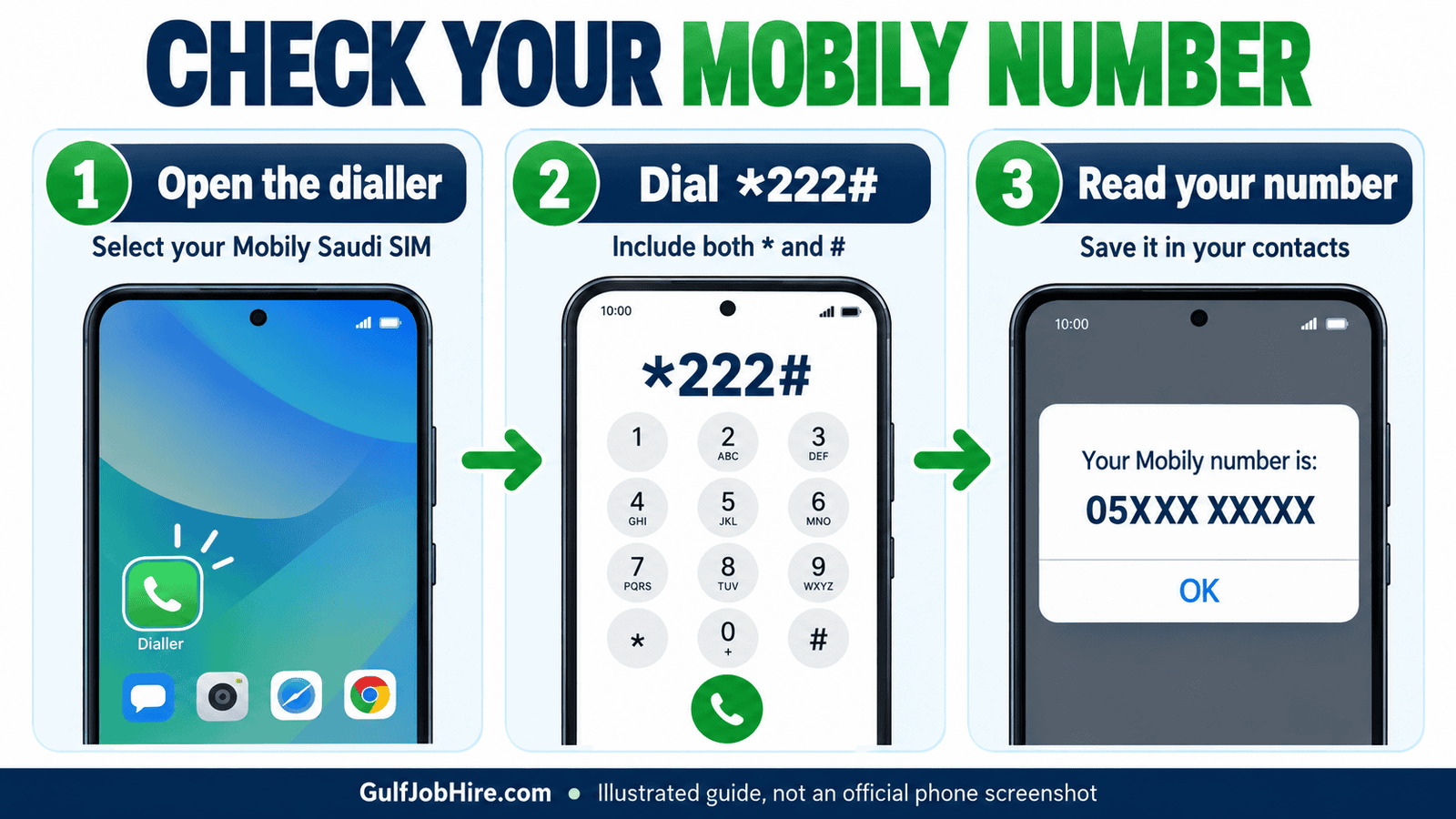
The source for this command is Mobily’s official Visitor package user guide. A working SIM and network connection are still necessary for a network request. This article does not promise that the same response appears on every discontinued, suspended or data-only product.
A Mobily number check is different from checking your credit balance. If the response displays money or remaining data, you may have entered a different command. Clear the keypad and check every character before trying again. Stop if a menu offers a paid purchase or account change you did not request.
2. Check your Mobily app or online account
If you are already signed in, check the line shown in your official Mobily account. This is especially useful when you manage more than one SIM. Confirm the selected service rather than assuming the first number displayed belongs to the SIM in your phone.
- Open the official Mobily app, or start from the Mobily website and use its account sign-in option.
- Sign in through the normal verification process if required.
- Look for your selected line, service details or account overview. Labels can vary with the app version.
- If several services appear, select the mobile line you want to identify.
- Copy the number and compare it with the dialler response or a trusted incoming-call record.
If login asks for the very number you are trying to find, this method may not help yet. Return to the USSD method, check your SIM purchase documents or use official customer support. Avoid repeatedly entering guessed numbers into an authentication screen.
Only install the app through a link from Mobily’s official website or a trusted app store listing you have checked. Do not use an advertisement or message promising to reveal private SIM-owner information. Keep passwords, one-time codes and eSIM activation QR codes private.
For shared or family accounts, distinguish the person who pays the bill from the number assigned to the line you are using. Account access alone does not establish who currently holds a particular phone. Read the line details carefully before giving the number to an employer or entering it in a registration form.
3. Call or message a trusted nearby phone
When outgoing calls work and caller ID is visible, call someone you trust and ask them to read the incoming number. Select the Mobily line before calling. This provides a useful cross-check without relying on a remembered number in your contacts.
- Ask a trusted person to have their phone ready.
- Choose your Mobily SIM as the outgoing line.
- Make a short call and ask them to open the incoming-call details.
- Have them read or send back the full number as displayed.
- Compare it with your account or USSD result before saving it.
Normal call or SMS charges may apply according to your plan. An outgoing text can be another option when SMS is available, but do not assume that an internet messaging app shows the SIM currently selected for calls. WhatsApp and similar services can remain registered to a different number.
If the recipient sees “Private,” “Unknown” or no usable number, do not treat that as proof that your SIM has no number. Caller-ID restrictions can prevent this method from helping. Use the direct inquiry or customer care instead of changing account settings you do not understand.
Ask the recipient to read the actual call details, not a saved contact label. An old contact might contain a previous number. For the same reason, checking your own profile picture or messaging-app display name is not a reliable substitute for identifying the active mobile line.
4. Ask Mobily customer care for help
Contact Mobily on 1100 from a Mobily line, or 0560101100 from another network in Saudi Arabia. These contact routes appear in the operator’s official support information. The agent may need to verify your account before discussing line details.
- Call the appropriate support number and choose the relevant language or account option.
- Explain that you need to identify your own Mobily mobile number.
- State whether the SIM is in a phone, an eSIM profile or a router.
- Complete only the verification requested through the official support process.
- Ask the agent to clarify whether the number supplied is a mobile number or an account reference.
- Keep the support reference if the issue needs follow-up.
Mobily’s official data-device support guidance lists both numbers and the option of visiting a branch. If a phone menu does not resolve the issue, use the operator’s official website to locate an appropriate support channel or outlet.
Do not post an Iqama image, SIM serial, bank details or verification message in a public comment asking someone to identify the line. GulfJobHire publishes instructions and cannot access Mobily subscriber records. A public blog comment is not an account-verification channel.
A helpful support description is: “I need my own mobile number. My SIM is installed in [device], and the number inquiry returned [response]. Please confirm which identifier I should use.” This is clearer than asking for “SIM details,” which might refer to several different identifiers.
5. Use Mobily’s Please Call Me service
Mobily’s Kalemni service uses *188#. It sends a callback request to a recipient you choose. Ask a trusted recipient to check the sender number if their received message displays it. This is a callback service, rather than a dedicated subscriber-identity lookup.
- Dial
*188#from your Mobily line. - Follow the response to enter the trusted recipient’s mobile number.
- Review the details and send the request using the live menu.
- Ask the recipient to inspect the message’s sender information.
- If no usable number appears, use another method.
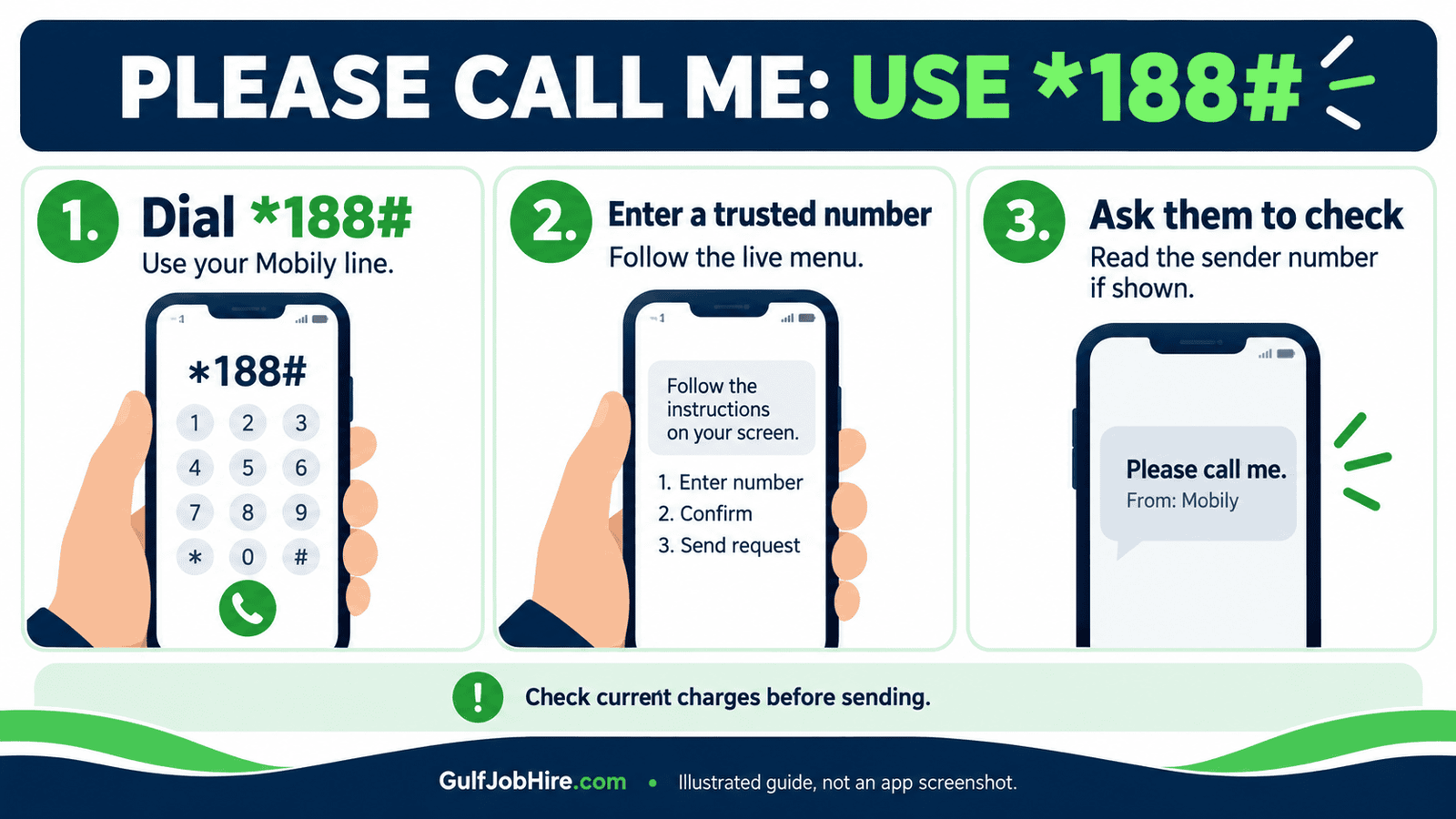
The official Kalemni page states that the first three requests per day are free and lists a SAR 0.15 charge after the third. Check the operator’s current terms before relying on this allowance. While roaming, the page says the visited operator must support star-command services.
Send a request only to someone who expects it. Repeated messages to an unfamiliar number are unnecessary for a Mobily number check. If the service fails abroad, use your account over an available internet connection or contact official support.
Why SMS 1 to 1411 is not an owner-details check
Do not rely on SMS 1 to 1411 to reveal the SIM owner’s name, address or activation date. Mobily’s official guidance describes it as a balance or package-benefits inquiry for relevant products. That is a different task from finding your telephone number or verifying subscriber ownership.
The operator’s package-benefits guidance specifically identifies this SMS route for postpaid lines. Other packages can have different inquiry instructions. Follow your plan’s current page rather than assuming every SMS keyword has the same purpose across all Mobily services.
If you already sent the message, read what the reply actually says. A data allowance, minutes balance or bill figure is not evidence of a subscriber’s identity. Do not interpret an automated response as permission to access someone else’s records.
Finding your own number also does not reveal a person’s live location. The original draft’s broad claims about obtaining addresses and locations have been removed. For a genuine account mismatch, ask Mobily to investigate through its authenticated customer process.
Mobile number, SIM serial and account number: the difference
| Identifier | What it means | When you might need it |
|---|---|---|
| Mobile number | The telephone number assigned to the line | Calls, SMS and giving people your contact number |
| SIM serial / ICCID | An identifier for the physical SIM or eSIM profile | SIM support or replacement processes |
| Account number | A reference for a particular operator account | Payments or support when the operator requests it |
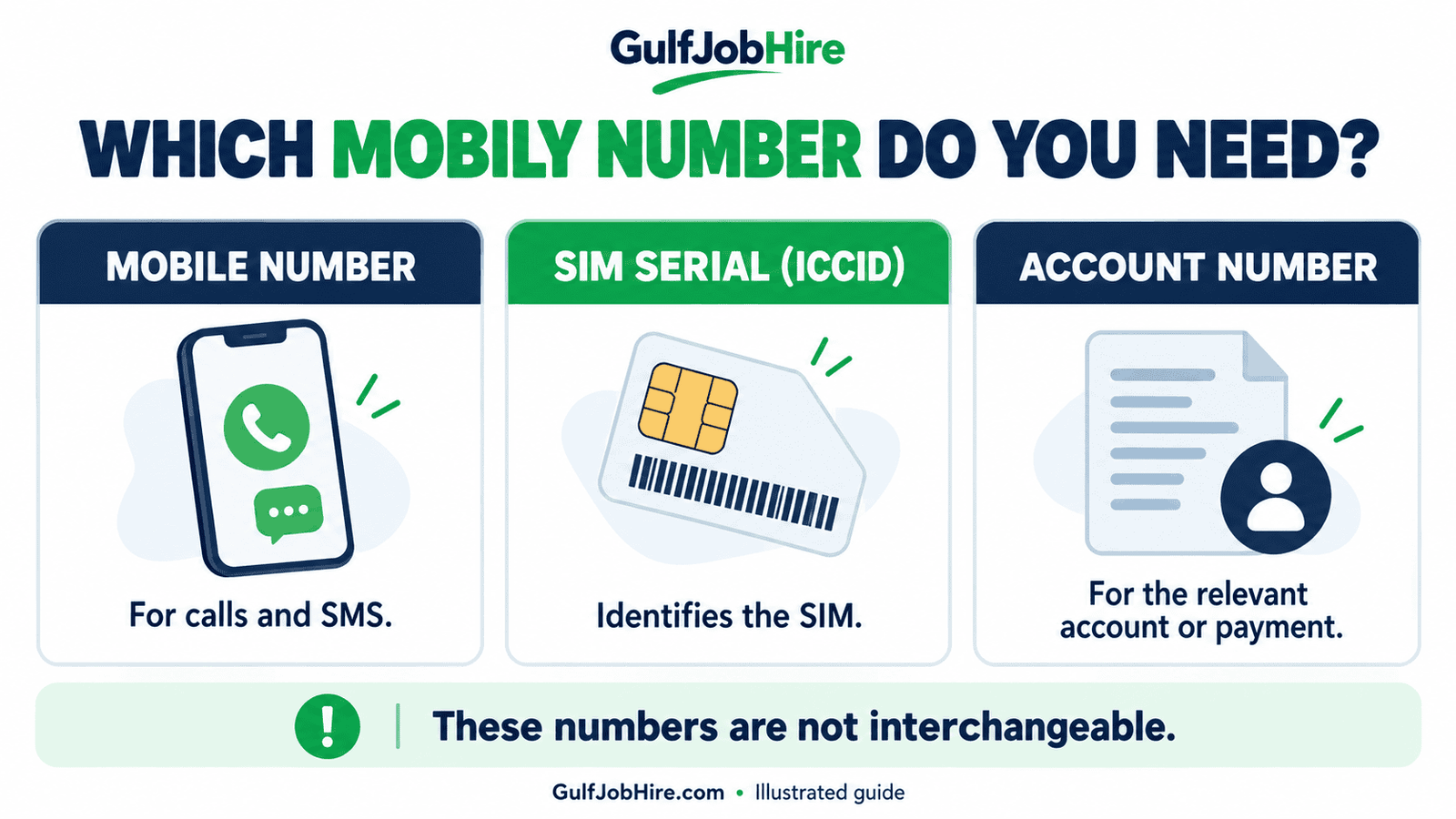
This distinction matters for routers and older data products. Mobily’s Connect migration notice describes an Internet Account Number and directs relevant customers to *222# followed by option 1. It does not establish that every router will return a normal voice-line number.
If a form asks for a number and you are unsure which one it needs, read the label or ask support before paying. Never assume that a long number printed on a SIM holder is the number another person should dial to call you.
Mobily number check not working? Troubleshooting
First recheck the code and selected SIM. A failed Mobily number check can result from the wrong outgoing line, a typing error, weak service or a restricted account. A single error does not establish that the SIM has been cancelled.
| What happens | What to try |
|---|---|
| Invalid MMI code | Retype *222# manually; select the Mobily line |
| No signal | Check that the SIM or eSIM is enabled and the phone has network service |
| Wrong line’s details | Check the dual-SIM call button and account line selector |
| App requires an unknown number | Use the dialler, purchase records or official support first |
| Account number appears | Check whether the product is a data or Connect service |
| No SIM available | Use account records and support; a dialler code cannot query a missing line |
| Request fails while roaming | Use the official account or contact support; domestic menus may be unavailable |
On an eSIM phone, select the actual Mobily profile rather than an old label you gave another line. Do not delete an eSIM as a troubleshooting shortcut. Mobily’s eSIM information explains that activating a profile on another device can require a new QR code.
Phone settings may also show a number under SIM information or cellular details. Treat this as a cross-check because the field can be blank or outdated. If it disagrees with the network response, ask Mobily to confirm the current line before using it for an important account.
After your Mobily number check: save and verify it
Save the result as a clearly named contact, especially if you use separate work and personal lines. Confirm it through a second method when you plan to share it with an employer, recruiter or service provider. A small copying error can send a message to the wrong person.
For Saudi mobile numbers, the domestic format starts with 05. In international format, replace the initial zero with +966: 05XXXXXXXX → +9665XXXXXXXX. The X characters here are placeholders, not a real subscriber’s number. Do not keep the domestic zero immediately after +966.
A Mobily number check identifies a line; it does not list every SIM registered under your identity. For that separate task, read GulfJobHire’s guide to checking SIMs registered on your Iqama. Investigate unfamiliar registrations through official channels.
Managing another operator’s line too? Our Virgin Mobile service codes guide and STC balance check guide cover different network services. Always send an operator-specific command from the appropriate SIM.
Mobily number check FAQs
How can I check my Mobily SIM number in KSA?
Dial *222# from your Mobily line. If it fails, check your signed-in account, call a trusted phone or ask customer care for help.
Is the correct Please Call Me code *188# or *1888#?
Mobily’s official Kalemni instructions use *188#. Follow the recipient-number menu and review current service terms.
Does sending 1 to 1411 reveal the SIM owner’s name?
Mobily describes that SMS command as a balance or benefits inquiry for relevant plans. It should not be presented as a verified owner-name, address or activation-date lookup.
Can I do a Mobily number check without the app?
Yes. Use the dialler inquiry, contact customer care or call a trusted nearby phone when outgoing calls and caller ID are available.
What is Mobily customer care’s number?
Use 1100 from a Mobily line or 0560101100 from another network in Saudi Arabia.
Does the same code always show a router SIM’s phone number?
No universal response is established here. Some Connect guidance uses the menu to retrieve an Internet Account Number. Confirm which identifier your product and payment method require.
Can I use this guide to find someone else’s SIM owner?
No. These methods help identify your own line. Subscriber verification and account disputes belong with the operator’s authenticated support process.
Will the number inquiry work with no internet?
A USSD request uses the mobile network rather than a web page. Your SIM must still have network service. If the request fails, use another available method.
Sources and editorial review
GulfJobHire reviewed the linked Mobily Visitor instructions, Kalemni service page, official community guidance and Connect notice on 19 October 2026. Those sources support the relevant codes and distinctions above. We have not tested a private subscriber account, and this independent guide is not an official Mobily service.
For current product-specific terms, follow Mobily’s official website. For more practical information about living and working in Saudi Arabia, browse the GulfJobHire blog.