

To check your Huroob status in Saudi Arabia, open the official HRSD Non-Saudi Employee Inquiry, enter the requested identity details and image verification code, then read the employment status in the result. If it says متغيب عن العمل, it means “absent from work.” Contact the responsible authority promptly to confirm the report and the options available for your case.
This GulfJobHire guide explains the online inquiry, Arabic status messages, practical troubleshooting and where to seek help. It is useful for Pakistani workers and other expatriates in Saudi Arabia. Reviewed: 19 October 2026. This is general information; the official record and the rules applicable to your worker category determine your options.
On this page
What does Huroob status mean?
Huroob is a commonly used term for an absence-from-work report involving an expatriate worker. The Arabic word is هروب, while an official employment record may use wording such as متغيب عن العمل. Read the actual status and report details rather than relying on the informal label alone.
An absence report, an expired Iqama, a company’s Nitaqat rating and an exit/re-entry issue are different matters. One result does not establish all the others. For example, an “on the job” employment record does not prove that your residence document is still valid or that you have no immigration restrictions.
If your concern is your employer’s Saudization classification, use our separate Iqama color and company Nitaqat guide. If you are waiting for your resident ID, read how to find an Iqama number using a border number.
How to check Huroob status online through HRSD
The service is called Non-Saudi Employee Inquiry, or الاستعلام عن موظف وافد. People often refer to it as the MOL inquiry because of the ministry’s former name. Use the current government service directly instead of entering your information into an unofficial lookup website.
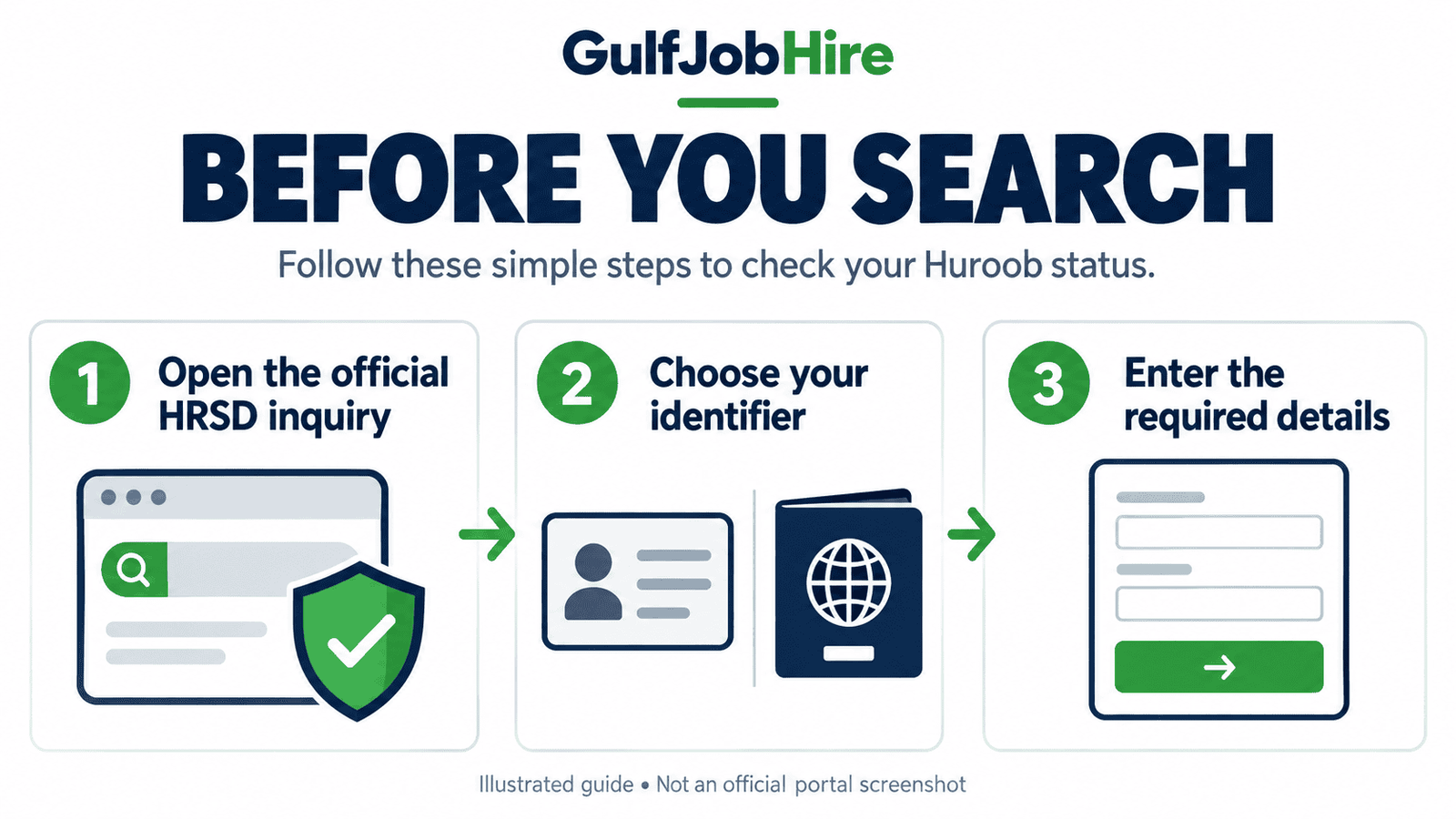
- Open the official HRSD employee inquiry.
- Choose the relevant identifier: border number, Iqama number, or passport number. Follow the form’s current requirements; a passport search requires nationality.
- Enter the details carefully. Select nationality where requested.
- Type the image verification code displayed on your screen. Use a newly displayed code if the image refreshes.
- Select Search (بحث).
- Check that the returned identity matches yours, then read the employment status. Keep a private copy with the date if you need to follow up.
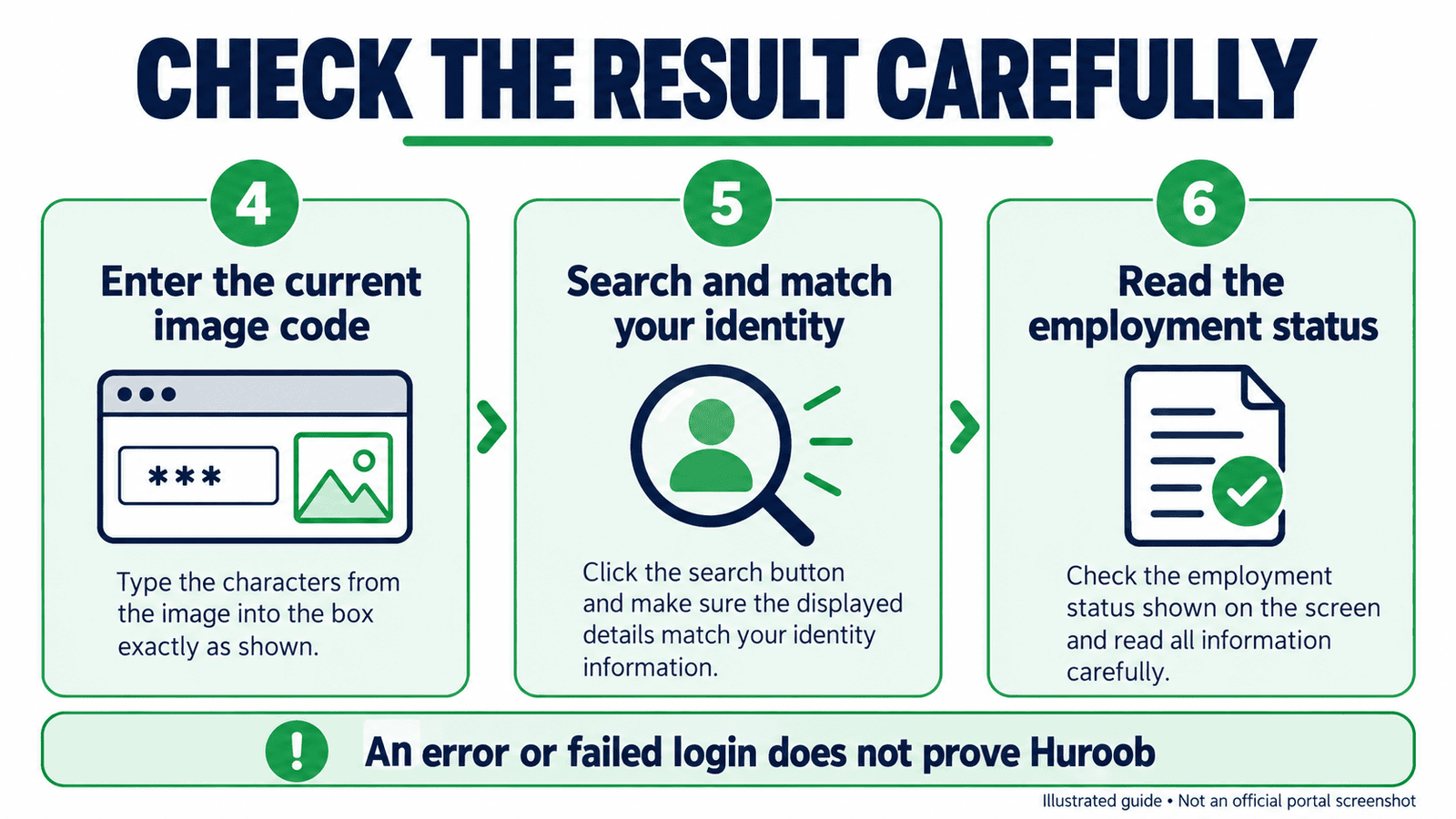
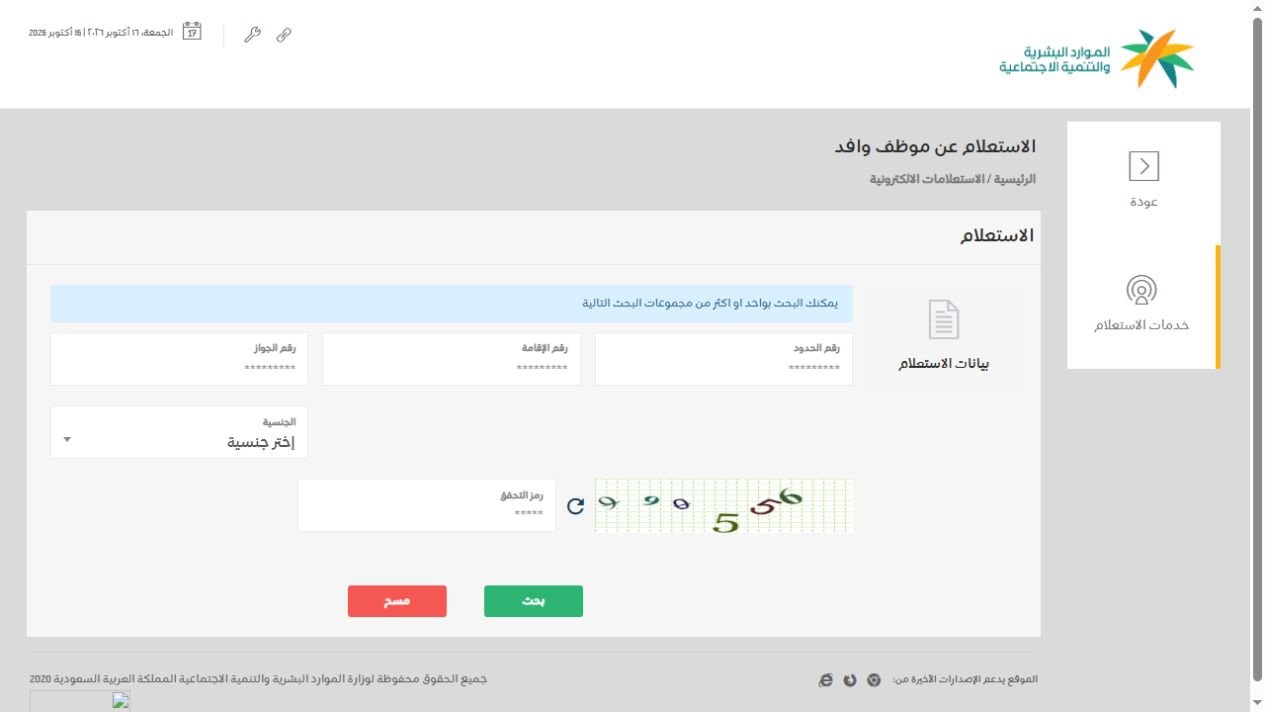
The form is a worker inquiry, not an absence-removal application. An unsuccessful search does not prove a report exists. No matching record, a validation error and an “absent from work” result require different responses.
How to read Arabic employment status messages
| Arabic wording | Meaning | Next step |
|---|---|---|
| على رأس العمل | On the job / employed | Check separate residence, contract or visa records if those are your concern. |
| متغيب عن العمل | Absent from work | Confirm the report, its date and the applicable correction or dispute route. |
| منقطع عن العمل | Work interruption / discontinuation | Check the case details and any deadline; do not assume this is identical to a finalized absence status. |
Translations help you understand the message, but they do not replace a case assessment. If the wording differs, save the complete message and ask the platform’s official support to explain it. Do not decide that a report has been cancelled based on an agent’s message or an edited screenshot.
Can you check Huroob through Absher, Qiwa or Musaned?
Absher provides government services connected with residency and immigration. Use it for the services actually available in your account. A failed Absher login is not evidence of Huroob. Password, verification and technical problems can prevent access. Likewise, a missing menu is not a reliable absence-status diagnosis.
Qiwa is relevant to private-sector employment contracts and eligible employee transfers. If your employment is managed through Qiwa, inspect your own contract and requests, then ask support which procedure applies. The worker inquiry and a transfer request serve different purposes.
Musaned is the relevant starting point for domestic-worker services. Domestic workers should not assume a company-worker procedure applies to them. Check the current contract, report and service details through the appropriate official channel.
What should you do if an absence report appears?
Start by establishing the facts. Record the exact wording, date of the result, employer shown and any report or request reference. Check whether the issue is an absence report, work interruption, a contract termination or a different record problem. These details help support identify the correct service.
- Collect your records. Keep your contract, identity documents, wage records, attendance evidence, approved leave and relevant employer messages.
- Check your official account. Review Qiwa or Musaned as appropriate, including notifications and dates.
- Ask for clarification in writing. Where safe and appropriate, ask the employer or HR department to explain the report and whether an official correction request is possible.
- Use official support. Contact HRSD through its official contact page and ask which complaint, dispute or regularization process covers your category.
- Track the request. Keep reference numbers and follow up on instructions and deadlines. Confirm the updated status through the official system after a decision.
If you believe the report is incorrect, describe the discrepancy clearly. For example: “The record shows absence, but I have attendance records and approved leave for those dates.” Submit authentic evidence through the channel the authority specifies. Do not alter documents or assume that an informal agreement has already changed the government record.
For a disputed report, immigration complication or imminent deadline, consider a qualified Saudi legal adviser. GulfJobHire publishes information and cannot cancel a report, decide eligibility or guarantee a transfer.
Can Huroob status be removed or transferred in 2026?
Some cases may have a lawful correction, dispute or transfer route. Eligibility depends on the report, worker category, dates, employer and current service conditions. There is no single cancellation method that works for everyone.
HRSD announced a professional-worker regularization initiative starting on 18 September 2025. It described transfers through Qiwa for specified workers recorded as absent, including certain cases following a 60-day grace period, documented-contract expiry or termination, and earlier absence reports. Conditions included the new employer paying outstanding work-permit fees and the worker having completed at least 12 continuous months in the Kingdom before the relevant interruption or contract expiry.
That announcement is evidence of a defined initiative, not proof that your case is currently eligible. Ask Qiwa to confirm availability and the requirements shown for your record before relying on it. Do not treat an old announcement as an unlimited amnesty.
Does everyone get 60 days?
No single deadline should be assumed for all cases. The HRSD procedural guide for workers without electronically documented contracts describes a 60-day period for specified transfer or final-exit procedures under its conditions. This scope matters: it should not be applied automatically to every contract or absence report.
Domestic-worker procedures also have their own rules. A February 2026 official announcement about Musaned work interruption described different options depending on whether the worker was within the first two years after entry or had stayed longer. Confirm the current procedure and your recorded dates through Musaned. Ask support for the exact last date applicable to your case.
Are fines, deportation or entry bans automatic?
Do not rely on a universal fine or a fixed re-entry-ban period quoted on social media. Consequences depend on the established violation and applicable official decision. A worker inquiry is not a complete immigration, criminal-record or travel-ban check. Ask the responsible authority or a qualified adviser about your actual record before making travel plans.
Huroob status check troubleshooting
No record or invalid number
Check the identifier type and every digit against your own document. A border number and an Iqama number are different identifiers. For passport inquiries, match the passport number and nationality. If your details recently changed, explain the change to support rather than repeatedly searching unrelated numbers.
The image verification code is rejected
Enter the current image code carefully and submit without unnecessary delay. If the image refreshes, use the new one. Avoid automated attempts or third-party services offering to bypass verification.
The portal does not load
Check your connection and retry the official service later. If you began from an old bookmarked MOL address, navigate through HRSD’s official website to the inquiry service. A timeout or temporary outage does not show whether your status is regular or absent.
The result does not match another platform
Record both messages with their dates, then ask the appropriate platform to reconcile the discrepancy. Different services may describe different records or stages. A successful login or an approved request alone is not confirmation that every linked record has been updated.
Someone offers guaranteed removal for payment
Ask which official service and eligibility rule they intend to use. Do not share an OTP, password or unrestricted account access. Keep receipts for legitimate professional services and verify any claimed outcome yourself through the government platform.
Prepare a clear Huroob status support request
A well-organized request makes it easier to explain what happened. Before contacting support, write a short timeline in your own words. Include when you last worked, when you received a notification, when you checked the portal and what the result actually said. Keep your description factual. An inquiry result and your explanation are separate pieces of information; send both if the official complaint channel asks for them.
Store full identity documents securely. You may need them in an authenticated official service, but there is no reason to publish them in a social-media group or underneath this article. For general guidance, describe the problem without displaying your full Iqama, passport number, date of birth or verification messages. If a screenshot is needed outside the official case system, redact private fields first.
| Prepare | What it helps explain |
|---|---|
| The exact Arabic status and inquiry date | Which record you are asking about, and when you saw it. |
| Your contract and relevant notifications | The employer, employment category and sequence of events. |
| Attendance, approved leave or wage records | The specific facts behind a disputed absence. |
| Earlier support reference numbers | What has already been reported and which response needs follow-up. |
| A short question about the next action | Whether you need a correction, complaint, transfer assessment or another service. |
A useful support message is: “My employment inquiry shows this status on this date. I believe the record needs review because of these facts. Please confirm the report date, the procedure available for my worker category and any deadline.” Fill in the facts privately in the official channel. This is a communication example, not a legal complaint form or a guarantee of acceptance.
Ask for a reference number after submitting a request. Record which channel you used and the date. If you receive a response that does not answer your question, refer to that response in your follow-up rather than opening several unrelated conversations. Follow any case-specific instructions about supporting documents, appointments and response dates.
Three examples of unclear Huroob status results
Example 1: The inquiry returns no matching worker
You enter a number, but the form does not return a matching employee. First check that you selected the correct identifier and that the number belongs to the document you are using. Review any nationality requirement and the validation message. If the problem continues, explain the exact error to official support. The absence of a result is not the same as a result saying “absent from work.”
Do not keep changing the nationality or entering another person’s number to make a record appear. A result is useful only when it matches your own identity. If you are waiting for a newly issued document or have recently changed passport details, mention that context when asking why the search does not match.
Example 2: HRSD says employed, but Absher will not open
These observations do not establish an absence report. Treat the login problem as an account-access issue and use the official account recovery or help options available to you. Keep the employment result separate from the login error. If your concern is residence expiry, check the relevant residency service once you regain access rather than treating the employment label as an expiry date.
Do not give an intermediary your verification code so they can “test” the account. You can describe an error message without handing over your account. Once access is restored, check the specific record you needed; successful login by itself is not a complete check of residence, employment or travel eligibility.
Example 3: A transfer request exists, but the old status remains
Check the request’s current stage and any official completion notice. A submitted request, employer offer and completed transfer are different stages. Ask the platform whether another action is required and which record should change after completion. Keep the request reference so support can locate it. Do not begin a new job or arrange departure solely because someone says the process is nearly finished.
If you believe a completed decision has not been reflected, describe that mismatch precisely. State the completion date shown and the date of the unchanged inquiry result. Let the platform explain the next step instead of assuming that waiting a fixed number of hours always resolves it. There is no universal processing time established by the examples in this guide.
Huroob status: frequently asked questions
Can I check Huroob status without Absher?
The public HRSD Non-Saudi Employee Inquiry displays an identity and verification form. Use that inquiry for the employment record. An Absher login problem does not establish an absence report.
Can I use my passport number?
The HRSD inquiry includes a passport-number option and requires nationality for that search. Follow the current form’s instructions and confirm the returned identity.
Does “on the job” mean my Iqama is valid?
It describes the employment status returned by that service. Check residence validity separately through the relevant official service.
Can I travel if my record says absent from work?
Do not use the worker inquiry as travel clearance. Confirm your residence and immigration position, any restriction and the permitted exit procedure through the responsible authority before booking.
Can my employer cancel any report at any time?
Do not assume that. The available procedure depends on the report stage, applicable rules and worker category. Ask the official platform which action is available for the case.
Is Huroob the same as not returning on an exit/re-entry visa?
These should not be treated as interchangeable records. If you are outside Saudi Arabia or missed an exit/re-entry deadline, ask the relevant immigration authority about that specific situation.
Can GulfJobHire remove Huroob?
No. GulfJobHire provides guides and employment information. Report correction, transfer and immigration decisions must go through authorized official processes.
Related GulfJobHire guides
- Find your Iqama number by border number
- Check your company’s Nitaqat status
- Check SIM cards registered under your Iqama
Keep your identity details private when asking for help. Share this guide rather than a screenshot containing your Iqama or passport number.