Check Iqama color in Saudi Arabia using the correct official inquiry. This 2026 guide explains company Nitaqat status, worker inquiry fields and the separate check for your residence expiry.
On this page

What does “check Iqama color” mean?
To check Iqama color, look up your employer’s Nitaqat classification through an official HRSD inquiry or an authorized Qiwa business account. Check residence validity separately through Absher. A company band is not the expiry status of your personal residence permit.
People often use “Iqama color”, “company color” and “Nitaqat status” for the same employer-related question. That shorthand can be confusing: the physical color of your card is not a test of whether you can renew a document, change employers or remain in the Kingdom.
This guide explains the available inquiry routes, the information each form requests, and how to follow up on an unclear result. It is relevant to Pakistani, Indian, Bangladeshi, Filipino and other expatriate workers checking their own employment records.
Last checked: 16 October 2026. Screenshots show empty official forms, not anyone’s personal record. We have not submitted a worker’s private information or tested a live individual result.
Iqama validity, worker status and company Nitaqat: the difference
| Question | Record to check | Where to begin |
|---|---|---|
| Is my residence permit current? | Personal Iqama validity and expiry | Official Absher service |
| What does the labor record say about me? | Non-Saudi employee inquiry | HRSD worker inquiry |
| Which band applies to the employer? | Company/entity Nitaqat classification | HRSD establishment inquiry or authorized Qiwa account |
| Can a renewal or transfer proceed? | Specific transaction eligibility | The relevant official service and its current conditions |
Keep these questions separate when speaking to HR. “My status is wrong” may refer to a date, an employer association, a worker record or an application. Naming the exact record makes a useful response more likely.
For example, someone who wants to check Iqama color before a renewal should also confirm the actual expiry date and the transaction’s progress. A positive-looking company result does not show that an individual renewal has already been completed.
How to check Iqama color using the worker inquiry
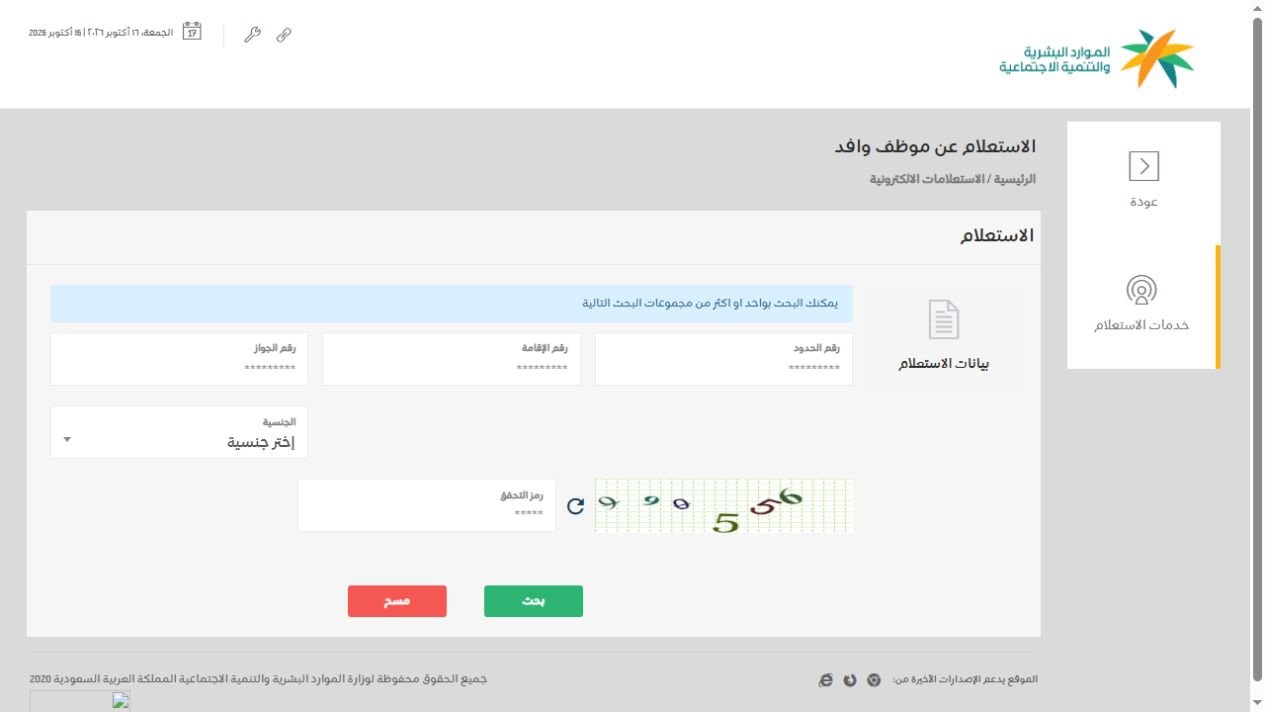
Start at the official HRSD Non-Saudi Employee Inquiry. The Arabic heading is الاستعلام عن موظف وافد. The form checked for this guide shows border number, Iqama number, passport number, nationality and image-code fields.
- Open the official inquiry and confirm the domain is es.hrsd.gov.sa.
- Choose the identifier available for your own record and enter it in its matching field.
- Select the correct nationality where required by the form.
- Read the verification image currently displayed and enter its code.
- Choose بحث, meaning Search.
- Review the returned record carefully. If establishment evaluation appears, read it as employer information; otherwise use the separate company inquiry below.
Complete the fields requested for your chosen search combination. Do not enter one identifier in every box, or assume all three document numbers are necessary. Follow any validation message shown by the official form.
When you check Iqama color, verify that any returned identity and employer details match your case before interpreting other information. If the result is absent or unclear, it does not by itself prove that your employer has a particular band.
How to check company Nitaqat status directly
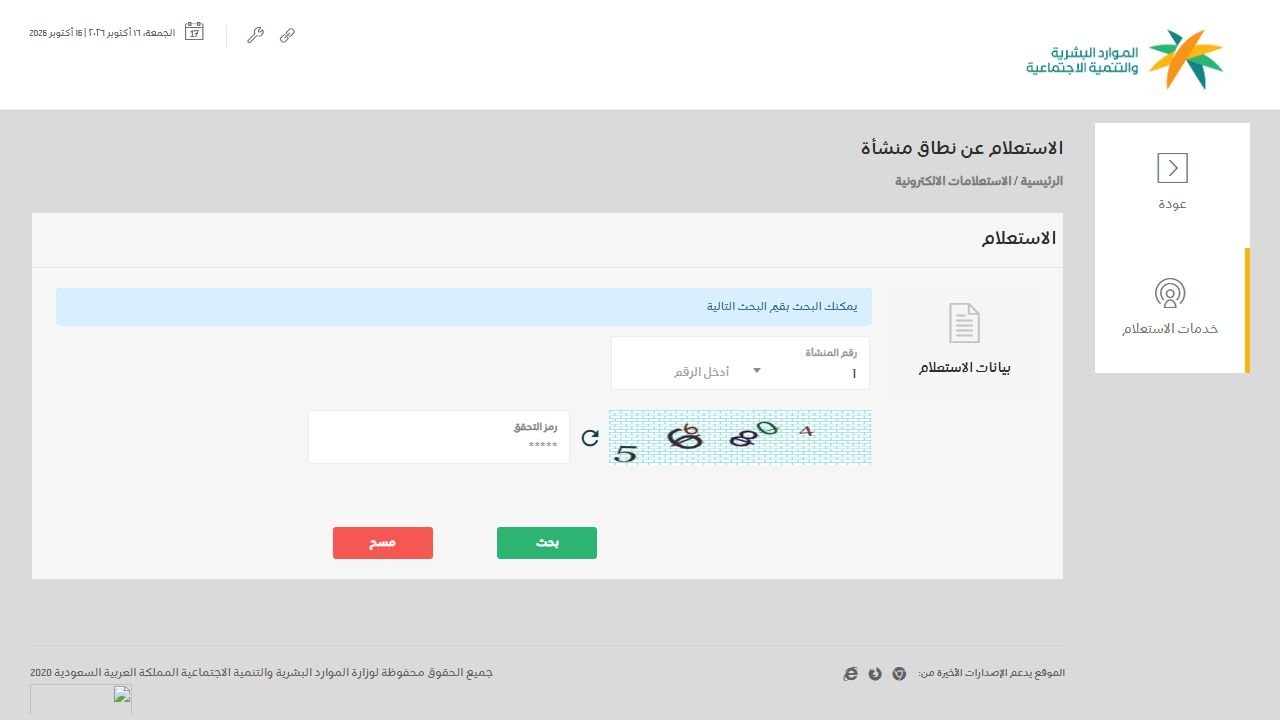
The HRSD establishment Nitaqat inquiry is a separate form. Its heading is الاستعلام عن نطاق منشأة. It uses an establishment-number selection and sequence field, plus a verification image.
- Ask the employer’s HR team for the correct establishment details used for this inquiry.
- Open the official establishment inquiry.
- Select the appropriate labor-office number component from the dropdown.
- Enter the establishment sequence in the number field.
- Enter the current verification code and choose بحث.
- Match the returned establishment before relying on its classification.
This is why the instruction “enter your Iqama number on the company inquiry page” is misleading. A worker identifier and an establishment identifier are different inputs.
If you do not know the establishment details, ask HR to confirm them. Do not guess a number or use a commercial registration number merely because it is the only company number you have. Ask which identifier belongs in the specific field you are viewing.
Keep a note of the inquiry date and which establishment was checked. A screenshot without that context is much less helpful when you later ask someone to explain a mismatch.
Check Iqama color through an authorized Qiwa account
HRSD’s establishment-scope service description directs business users to Qiwa: sign in to the business-owner account, open Establishments and select Establishment Assessment to view the scope.
This is an employer-facing route. An ordinary employee should not assume their personal account includes the same business dashboard. If you cannot see the establishment assessment, ask an authorized employer representative to provide current confirmation.
Open Qiwa’s official website yourself rather than following an unknown login link sent in a message. Use only your own authorized access. There is no need for a worker to obtain or share a manager’s password simply to request clarification.
Menu names can change as the service develops. If the screen differs from a screenshot, use the service title and official help resources to locate the assessment. A changed layout is not evidence of a changed company band.
For a conversation with HR, a useful request is: “Please confirm the current Nitaqat band for the establishment linked to my employment and whether any condition is blocking my pending transaction.” This is more precise than asking only for a color.
The five Nitaqat bands in the 2026 guide
The official 2026 Developed Nitaqat procedural guide lists five bands: Platinum, High Green, Medium Green, Low Green and Red. Classification depends on the applicable Saudization calculation; there is no single percentage that describes every employer.
| Band | Selected service effects in the guide |
|---|---|
| Platinum / High Green / Medium Green | Visa requests, permitted profession changes and work-permit renewals remain subject to service conditions. |
| Low Green | New visa requests and profession-change requests are suspended; conditional work-permit renewal remains available. |
| Red | Restrictions include new visas, incoming worker transfers, profession changes and issuing or renewing expatriate work permits. |
These are selected employer-service effects, not a decision about an individual’s case. Do not convert a band into a guarantee of job security or an automatic right to transfer.
Why old guides mention Yellow or “excluded” categories
HRSD’s Ministerial Decision 63717 abolished the Yellow Nitaqat band and moved affected establishments to Red, effective 1/6/1441 AH. Older search results and legacy pages can still use the previous terminology.
That does not mean every yellow icon anywhere on a ministry website is the old Nitaqat band. Read the label and the purpose of the screen. A warning color in another service can communicate a different issue.
The claim that every business with fewer than six workers is automatically “excluded and treated like Green” should not be used as a current universal rule. Check the employer’s actual assessment and applicable requirements instead of inferring its status from staff numbers.
When you check Iqama color using an old article, inspect its source date and the document it cites. A page can be newly republished while still repeating an earlier program description.
Check Iqama expiry separately through Absher
For residence validity, use Absher’s official platform and the relevant Iqama or Resident ID expiry inquiry available to your account. Absher’s service guide describes this as a way to inquire about Iqama expiry information.
- Sign in using your own account through the official website or app.
- Locate the resident-ID validity or Iqama-expiry inquiry.
- Provide the information requested by that service.
- Review the expiry information and confirm which person the record belongs to.
- Ask the responsible employer or authority about any discrepancy or pending renewal.
Do not rely only on a photograph of a card, an old chat message or a company band to answer the expiry question. Use the relevant current official record.
If you have recently arrived and do not yet know the number, read our guide to finding an Iqama number using a border number. Establishing which identifier is available comes before choosing the inquiry form.
What to do if the company result is Red
First, make sure the result relates to the correct establishment and record the date. Then ask HR which transaction is affected and what practical steps are being taken. Keep the answer connected to your documents and deadlines.
- Check your personal residence expiry and any work-permit or renewal information available through the responsible official service.
- Collect your contract, application references and relevant messages from HR.
- Request a clear explanation of any pending transaction and the action required from each party.
- If a transfer is being considered, ask about the current Qiwa procedure and your individual eligibility.
- Use official support if the employer cannot explain the record or an urgent deadline remains unresolved.
Do not assume you can start working elsewhere because an internet post says Red automatically removes every transfer condition. Obtain the relevant approval through the official process before acting on a proposed change.
Likewise, a company result alone does not settle a dispute about pay, contract terms or a missed renewal. Keep evidence about the actual problem so that a support officer can identify the appropriate service.
A practical HR message is: “I checked the establishment record on this date. Please confirm whether it is the establishment associated with my employment, explain the impact on my pending request, and provide the application reference and next action.”
Troubleshooting an Iqama color inquiry
The verification code is rejected
Refresh the image if it is unclear, then type the new code shown on the page. The sample code in a tutorial screenshot will not work for your session. Avoid repeated guesses; recheck the image and the rest of the form.
The form says a number is invalid
Check that you used the correct field, copied all digits and removed spaces introduced by messaging or document scanning. For an establishment inquiry, verify both number components with HR. Do not change a digit merely to make validation pass.
No record appears
Recheck the identifier, nationality and any validation message. A missing result is not a reliable color classification. If the data is correct, ask the employer or official support how to resolve the inquiry.
The employer name does not look right
Stop before using the result for a decision. Ask HR to explain the registered establishment details and how they relate to your employment record. Do not assume a familiar trading name must be identical to every official label.
The site is unavailable
Try again later through the official inquiry directory. A connection error, blank screen or maintenance message does not mean your residence has expired or your employer is Red.
The result differs from an older screenshot
Compare the source, establishment identifier and inquiry dates. Ask for current confirmation from the responsible representative. Preserve both records with dates rather than deciding which one is correct from its appearance.
Arabic labels that help you use the forms
| Arabic label | Meaning |
|---|---|
| الاستعلام عن موظف وافد | Non-Saudi employee inquiry |
| الاستعلام عن نطاق منشأة | Establishment scope / Nitaqat inquiry |
| رقم الإقامة | Iqama number |
| رقم الحدود | Border number |
| رقم الجواز | Passport number |
| الجنسية | Nationality |
| رقم المنشأة | Establishment number |
| رمز التحقق | Verification code |
| بحث | Search |
| مسح | Clear |
Browser translation can help you read the surrounding text, but compare translated field names with these labels before submitting. If a translation looks odd, return to the original page and confirm which number the field requires.
When asking someone for help to check Iqama color, describe the label you see rather than sending a full unredacted identity document. A field name and an error message are often enough to explain a navigation problem.
A practical checklist before you contact HR
Prepare a short, factual note so the person assisting you can act on it. Include the date, exact service name, the problem and any approaching deadline. Keep identifiers in a private, appropriate channel.
- Write down whether you are checking residence expiry, a worker record, an employer band or a specific transaction.
- Record which official service you opened and the wording of any error.
- Confirm the identifier belongs to you or the establishment you intend to check.
- Save the relevant result securely with its date.
- List the one or two questions you need answered.
- Ask for an application reference if someone says a request has already been submitted.
- Keep the response and follow up on the stated next step.
For a renewal concern, a reference number and a clear timeline are more useful than a general reassurance. For an establishment mismatch, the registered details matter more than the color shown in an unrelated screenshot.
Use the checklist when helping a colleague too. Obtain their consent before handling their documents, and let them enter private account credentials themselves. Helping someone navigate a public form does not require keeping a copy of all their personal records.
FAQs: check Iqama color and Nitaqat status
Is Iqama color the physical color of my card?
No. In this search context, the phrase usually refers to an employer’s Nitaqat classification. Use the relevant official record rather than judging the appearance of a card.
Can I check Iqama color using a passport number?
The official worker form includes a passport-number field and nationality selector. Follow the search combination and validation requested. That does not mean the separate company inquiry accepts a passport number.
Do I need an Absher login for the public HRSD inquiry?
The two public HRSD forms inspected for this guide displayed search fields without an Absher login. Absher and authorized Qiwa business services have their own access requirements.
Does a Green result prove my Iqama has been renewed?
No. Check the personal expiry record and ask for the status of the actual renewal. Company classification and completion of a transaction answer different questions.
Can an employee use the Qiwa business assessment?
It requires the relevant authorized business access. If that assessment is not available in your account, request current confirmation from your employer’s authorized representative.
Should Pakistani workers use a different inquiry?
Use the same official service relevant to your question and select your actual nationality when requested. A recruitment agency’s marketing claims do not replace the official record.
Can GulfJobHire change my company’s rating?
No. GulfJobHire provides this informational guide. Corrections, assessments and transaction decisions belong with the responsible employer and official authorities.
Official support and related resident guides
If you cannot resolve a labor-service query, use HRSD’s official contact channels. The ministry lists 19911 for its contact center. Check the current channel hours and describe the exact inquiry or transaction you need help with.
For an account-access problem, use the support route of the platform you are actually trying to access. For a residence record, use the appropriate Saudi residence service. Sending every issue to the same place can delay the useful answer.
Do not post full Iqama numbers, passport scans, login passwords or one-time codes in blog comments. If you share a screenshot with a trusted support channel, remove information unrelated to the request and keep the original securely for your own records.
Continue with checking the SIMs registered on your Iqama, our STC balance guide, or the Saudi Iqama travel guide. Browse the GulfJobHire blog for more practical resident information.