Pak Soft Skills Certification helps Pakistani job applicants document completion of OEC soft-skills training. This 2026 guide explains registration, login, certificate checks and the questions to confirm before overseas employment.
On this page

What is Pak Soft Skills Certification?
Pak Soft Skills Certification is a training-completion certificate available through OEC’s PakSoftSkills platform. Start at softskills.oec.gov.pk, register with your own details, complete the assigned learning and assessments, then follow the account’s certificate instructions.
This guide helps Pakistani applicants prepare an account, avoid registration errors and organize the certificate for an overseas-employment file. It also separates training completion from job selection, a work visa and Protector registration.
Checked: 16 October 2026. We inspected the public portal, registration form and verification section. We did not create an applicant account, take an assessment or inspect a private learner dashboard. Screenshots show public pages without an applicant’s personal information.
Pak Soft Skills Certification: quick reference
| Question | Practical answer |
|---|---|
| Where should I start? | The official OEC PakSoftSkills portal linked above. |
| What should I prepare? | Your CNIC details, correct date of birth and contact information you control. |
| Does training guarantee a job or visa? | No. Check the separate recruitment and immigration requirements. |
| How long will it take? | Plan around the assigned learning and assessments; no fixed completion time is promised here. |
| Is it a trade test? | No. Confirm any occupation-specific assessment separately. |
| Where do I check Protector requirements? | BEOE or the responsible Protectorate of Emigrants. |
Use this table to identify your next action rather than treating a course certificate as the answer to every employment requirement. A recruiter may ask for several independent records, each issued by a different authority.
Is Pak Soft Skills Certification mandatory for overseas jobs?
Pakistani reporting describes a soft-skills certificate requirement for new Protector registrations, including Gulf employment, with implementation dates revised during early 2026. However, BEOE’s official page presented a security check during this review, so we could not independently read its current notice or confirm every exemption.
Before submitting an employment file, check BEOE’s emigrant-protection guidance or ask your responsible Protectorate about your exact route. State whether this is a new registration, a return journey, a new employer or a change in visa circumstances. Do not assume that a rule reported for one category answers every other category.
The 31 January 2026 report describes a postponement for Gulf Protector registration to 1 March 2026 and links a BEOE notice. Treat it as a report, and obtain current official confirmation for your application.
Pak Soft Skills Certification is not itself a Saudi, UAE or Qatari work visa. Avoid wording such as “this certificate guarantees visa approval” or “all countries accept it for every job”. Ask who needs the document, at which stage, and whether the person giving advice is referring to Pakistan’s departure process or the destination’s entry rules.
Before you register: prepare these details
Set aside a quiet period to enter your information carefully. Keep your CNIC available and use the same name spelling as your identity documents. If your documents have different spellings, resolve the issue through the responsible authority instead of inventing a new version just for the training account.
- Name: decide how the name on your documents maps to the first, middle and last-name fields.
- Date of birth: check the date and the day/month/year order before moving on.
- CNIC: copy the digits carefully and compare the confirmation entry.
- Email: use an address you can access yourself.
- Mobile: confirm the country code and number format shown by the form.
- Password: create a strong password and store it securely.
If someone is helping you, remain present while the information is entered. You should retain control of the email, phone and login. Access to your own account matters when you need to correct a problem or retrieve a document later.
Do not place your full CNIC or password into a public comment asking for help. Describe the field or error first; personal records should only go through an appropriate official support channel when necessary.
How to register for Pak Soft Skills Certification
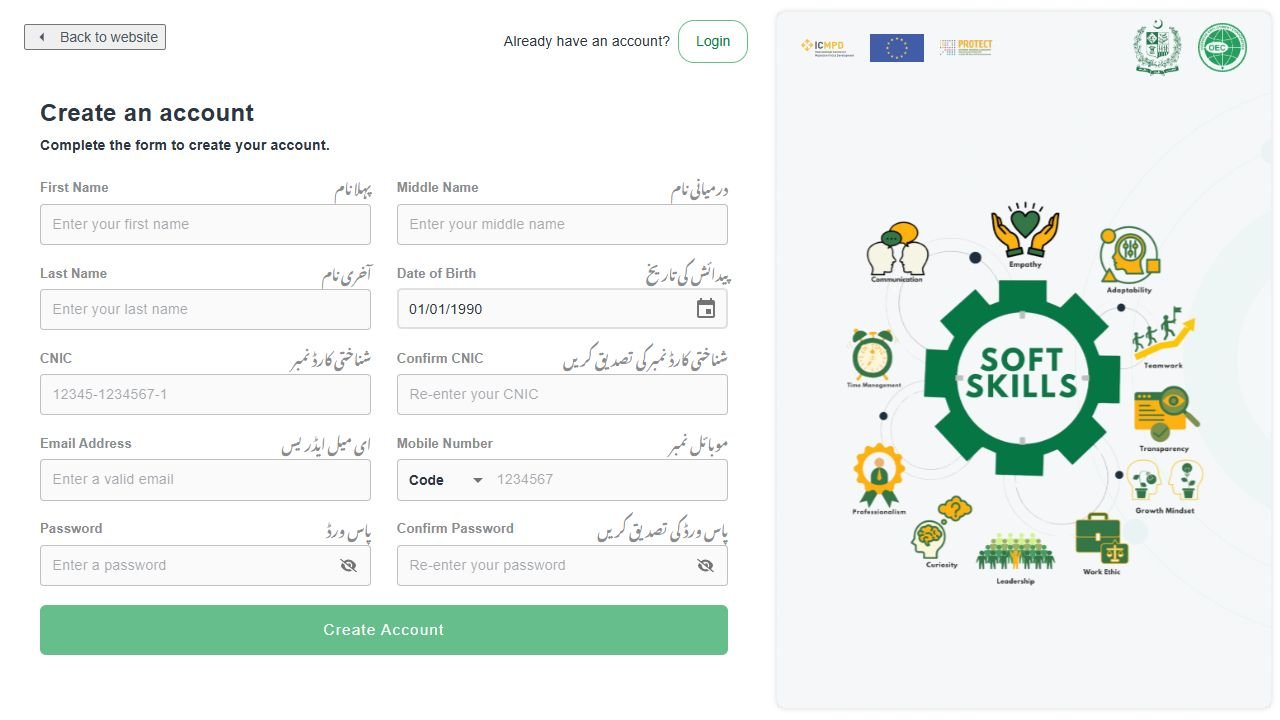
Open the portal and choose Register, or use the official account-creation page. The public form checked for this guide asks for first, middle and last names, birth date, CNIC and confirmation, email, mobile, password and confirmation.
- Confirm the website. The hostname should be softskills.oec.gov.pk.
- Enter your identity information. Compare names, date of birth and CNIC against your documents.
- Add your own contact details. Review the dialing code and number format.
- Create and confirm the password. Follow any strength rules displayed.
- Review the complete form. Check every field before selecting Create account.
- Follow the portal’s next prompt. Complete any verification requested and retain access to the account.
Do not copy sample values from a screenshot. In particular, change any date already visible in the form to your actual date of birth. A value displayed when the page opens is not confirmation that the portal already knows your identity.
This guide does not promise a specific OTP length or delivery time. If a verification step appears, follow the current screen. Enter the latest code only in the official session that requested it.
Login, complete your profile and select your route
The official login page uses CNIC and password and offers a Forgot Password option. If you already registered, try recovering access to that account rather than creating another account with altered identity details.
After login, follow the profile and career-path prompts in your account. Read each question in context and select the route that describes your actual application. If you are unsure whether your employment is through OEC, a licensed Overseas Employment Promoter or direct employment, confirm that with the organization handling the file.
Keep your application routes consistent. Someone who found a job directly should not select an unrelated recruiter simply because another learner used that choice. Likewise, a route selected in a tutorial is an example, not a recommendation for everyone.
For profile sections about education, occupation or experience, enter information you can support. If a field is not applicable, use the option allowed by the portal. Do not invent a qualification, employment history or certificate to advance to another screen.
Pause and seek clarification when a question is unclear. A few minutes spent understanding an employment route is preferable to building several later steps around incorrect information.
Complete the learning and assessments
The public curriculum covers communication, socio-cultural skills, teamwork, leadership and decision-making, personal development and financial literacy, alongside an introduction. Follow the modules actually assigned to your selected path.
For Pak Soft Skills Certification, approach the training as preparation for everyday workplace situations. Make brief notes in your own words and revisit an explanation you did not understand before attempting its questions.
- Communication practice: explain an instruction back in your own words to check that you understood it.
- Teamwork practice: consider how you would raise a problem without blaming a colleague.
- Cultural awareness practice: identify what you would ask when a workplace custom is unfamiliar.
- Decision-making practice: distinguish a routine decision from something that needs a supervisor’s approval.
- Money-management practice: draft a personal budget that leaves room for essential expenses and savings.
These are GulfJobHire study suggestions, not official assessment questions or an answer key. Use the course explanations to learn the material and submit your own answers.
Do not pay someone to take assessments in your name or buy a prefilled certificate. The useful outcome is a record attached to your own completed training and the ability to apply what you learned.
Download and check your Pak Soft Skills Certificate
After completing the requirements shown in your account, look for its certificate option. Follow the current download instructions and save the document in a location you can find again.
- Check that the account shows completion of all required items.
- Open the certificate option available to you.
- Download the file using the portal’s controls.
- Open the saved document to confirm it downloaded successfully.
- Compare the displayed identity information with your documents.
- Keep the certificate ID and a secure backup.
Name the file clearly, for example with the training name and issue year. Avoid filenames containing your full CNIC when you will send the file through several systems. Keep the original downloaded file rather than editing its contents to fix a mistake.
If a detail is wrong, ask OEC how to correct the record. Do not alter the PDF, substitute another person’s certificate or cover a mismatched name with an image editor.
Where an employer or Protector process requires a particular upload format, follow that process’s instructions. A phone screenshot, a downloaded document and a verification page serve different purposes; send the format requested by the receiving organization.
How to verify Pak Soft Skills Certification online
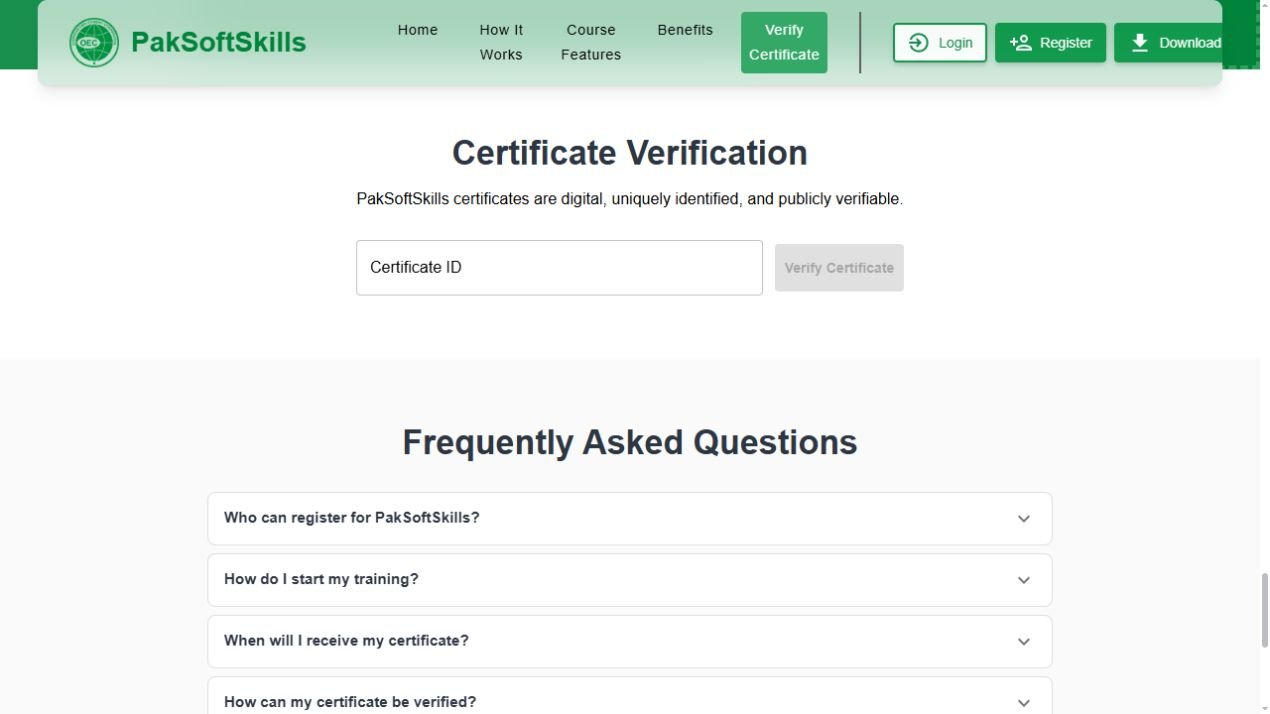
The official portal provides a Certificate Verification section using a unique certificate ID. Open it through the OEC PakSoftSkills website and enter the ID from the certificate you are authorized to check.
Compare the returned information with the document presented. A successful lookup is useful only when it matches the relevant person and record. Do not rely on a screenshot of a successful lookup for someone else.
If no record appears, check the ID for missing characters or extra spaces. Try the exact value printed or displayed by the official account. If the mismatch remains, contact the platform rather than creating a replacement certificate yourself.
Handle verification links carefully. A public record can disclose personal information, so share it only where necessary for the application. Avoid posting a certificate ID or QR code publicly just to demonstrate that you finished a course.
Fees, duration and validity: what to confirm
Fees: OEC has publicly listed Soft Skills Development Training as free on its official website. Its fee page also lists orientation and certification as free. Those statements should not be confused with separate recruitment, medical, visa or Protector charges. Confirm the current training terms with OEC before paying anyone.
Duration: do not organize a last-minute departure around an unverified “two to four hours” promise. Your schedule depends on the assigned content, assessments, connection and any account issue. Leave time to resolve errors and meet the receiving office’s deadline.
Validity: this review did not establish a universal lifetime-validity policy. Inspect your issued document and ask the organization receiving it whether there is a current issue-date or refresher requirement. A file remaining accessible does not establish that every process will accept it forever.
If someone quotes a fee, ask which service it covers, who receives the payment and what official receipt will be issued. A private assistance charge is not automatically an OEC certificate fee. Keep an itemized record so you can distinguish training from other employment expenses.
Registration, OTP, login and download problems
My CNIC appears to be registered already
Use account recovery or official support. Do not change a digit to create another record; that would no longer match your identity.
I cannot access the email or mobile used at signup
Explain the access problem to the platform through its official channel. Do not ask a third party to keep using credentials you cannot control.
A verification code has not arrived
Check the entered contact details and follow the resend instructions on the screen. Avoid requesting several codes in rapid succession. If the problem continues, record the time and error for support.
My password is not accepted
Check the CNIC format and keyboard settings, then use the official recovery option. Do not send your password in a support email.
A lesson or assessment does not appear complete
Read the completion instruction, check that you submitted the required activity, and reopen the relevant section. Keep a note of the module and error if progress still appears incorrect.
The certificate download does not open
Check the browser’s download list and device storage. Try reopening the file with a suitable viewer. If the download is empty or broken, use the portal again and report the issue if it persists.
My name or date is wrong
Request the correction procedure before submitting the document to another organization. Retain the original record and any support reference.
Use the certificate in your overseas-employment file
Pak Soft Skills Certification is one document within a broader application. Keep a checklist for the actual job offer and destination rather than replacing the employer’s instructions with a general internet list.
| Item | Question to resolve |
|---|---|
| Training certificate | Does the identity match, and is this the requested format? |
| Employment contract | Are the employer, job, pay and terms clear? |
| Visa or work permission | Does it cover the intended employment? |
| Protector process | Which current documents apply to this route? |
| Technical assessment | Is a separate occupation-specific test required? |
| Departure preparation | Have the responsible authorities confirmed the remaining steps? |
For destination planning, read our guide to getting a job in Dubai from Pakistan. For workers establishing themselves in Saudi Arabia, our Iqama-number inquiry guide and company Nitaqat status guide explain different resident checks.
Keep your training login separate from recruitment accounts. A company asking for a certificate normally needs the document or verification information, not unrestricted access to your account.
FAQs about Pak Soft Skills Certification
What is the official website?
Use the OEC portal linked at the start of this guide. Check the full hostname before entering personal information.
Will a certificate guarantee an overseas job?
No. Employer selection, the contract, work permission and departure requirements are separate matters.
Can I copy another applicant’s career-path choice?
Select the route that matches your own application. Ask the organization handling your file if the distinction is unclear.
Is a soft-skills certificate the same as a technical trade qualification?
No. Ask whether your occupation requires another assessment, license or qualification in addition to this training.
Should I create a second account after an error?
Try the official correction or recovery route first. Do not use altered identity details to bypass a problem.
Can I complete everything just before my flight?
Leave enough time for learning, any correction and the receiving organization’s checks. This guide does not promise same-day processing.
Does GulfJobHire issue this certificate?
No. GulfJobHire publishes this independent guide. Use OEC’s platform for the actual training record and certificate.
Where can I get help?
The portal lists softskills.app@oec.gov.pk. Explain the issue clearly and avoid sending passwords or unnecessary personal data.
Final checklist and official sources
- Use your correct identity and contact details.
- Keep control of the account and recovery channels.
- Complete the learning and assessments assigned to your route.
- Check the downloaded document before using it.
- Confirm current Protector and destination requirements separately.
- Keep support references and an organized copy of the employment file.
Use the official links beside each procedure to revisit the source. The main checks in this guide are based on OEC’s public portal and forms; the reported Protector implementation history is labeled because the official BEOE notice could not be read during this review.
Browse the GulfJobHire blog for related preparation guides. Share the checklist with a family member helping you organize documents, while keeping account credentials and identity records private.